Talk to an agent
moraine is built so that an AI coding agent can run it for you: the repository carries the instructions
(AGENTS.md), every command explains itself (--help, --json), the pipelines resume
where they stopped and the results can be checked without a plot script (moraine info, moraine quicklook).
You describe the data and what you want in plain words; the agent reads the guides, runs the verified
pipelines, compares the results with the expected ranges, looks at the pictures and reports.
A recorded session
What follows is a condensed transcript of a real session on 2026-10-08: Claude Code in the moraine
repository on a GPU node (one A100 of the machine, 128 CPU cores), processing the Campi Flegrei data set
(Sentinel-1 descending track 22, 92 dates from 2019-01-02 to 2021-12-29, 981 x 4160 pixels at full
resolution, GAMMA results in data/CampiFlegrei/gamma). The agent's words are shortened; every command, its
output, the numbers and the figures are from that run. The five pipelines took 500 s of processing.
Process the GAMMA data in data/CampiFlegrei/gamma (reference 20200707) up to phase unwrapping, working
directory manual_demo/campi. Tell me what you see.
I read AGENTS.md, the guide of the first workflow (docs/workflows/01_load.md) and the description of the data
set (data/CampiFlegrei/README.md): 92 dates, reference 20200707, the geocoding files are prefixed 20200707, and
GAMMA is on the PATH (which base_calc). I use one GPU (CUDA_VISIBLE_DEVICES=1) and the verified pipelines of
examples/, in order.
1. Load the GAMMA results
$ moraine run examples/01_load.toml --workdir manual_demo/campi \
      --var gamma=data/CampiFlegrei/gamma --var reference=20200707 --var geo=20200707
[rslc] load-gamma-flatten-rslc ... done in 125.8 s
[lat_lon_hgt] load-gamma-lat-lon-hgt ... done in 6.9 s
[look_vector] load-gamma-look-vector ... done in 3.8 s
[range] load-gamma-range ... done in 0.1 s
[metadata] load-gamma-metadata ... done in 1.8 s
[web_mercator] transform ... done in 2.5 s
[rslc_pyramid] ras-pyramid ... done in 20.9 s
$ moraine info raw/rslc.zarr raw/rslc_pyramid
  raw/rslc.zarr: complex64 (981, 4160, 92) chunks (1000, 1000, 1)
  raw/rslc_pyramid: complex64 (981, 4160, 92) raster pyramid, 10 levels
    stats_level=3, nan_fraction=0.404627, amplitude_min=0.000157993, amplitude_max=25.4198,
    amplitude_mean=0.363668, amplitude_std=0.345799, amplitude_p01=0.0229478, amplitude_p50=0.288358, amplitude_p99=1.56296
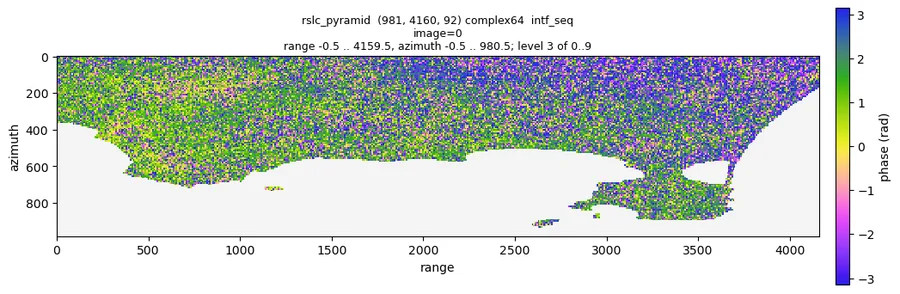
$ moraine quicklook raw/rslc_pyramid --show intf_seq --index 0 -o 01_intf_seq_0.png
The stack has the 92 dates (raw/meta.toml lists them, 12 days apart), the amplitude is in the expected range
(p50 0.29) and 40 % of the pixels are nan: the Gulf of Pozzuoli, masked by the coregistration, as the data set
description says. The first 12 day interferogram is noisy single look phase with structure on land and nothing
suspicious (uniform noise would mean a wrong reference date):
2. PS candidates. The guide says to set shape to the (nlines, width) of the stack: 981, 4160.
$ moraine run examples/02_ps.toml --workdir manual_demo/campi --var shape=981,4160
[adi] amp-disp ... done in 11.4 s
[n2f] n2f ... done in 32.3 s
[n2f_temp_coh] temp-coh ... done in 11.7 s
[ps_can] pc-union ... done in 0.3 s
[ps_can_data] ras2pc ... done in 6.0 s
(13 steps, 64 s)
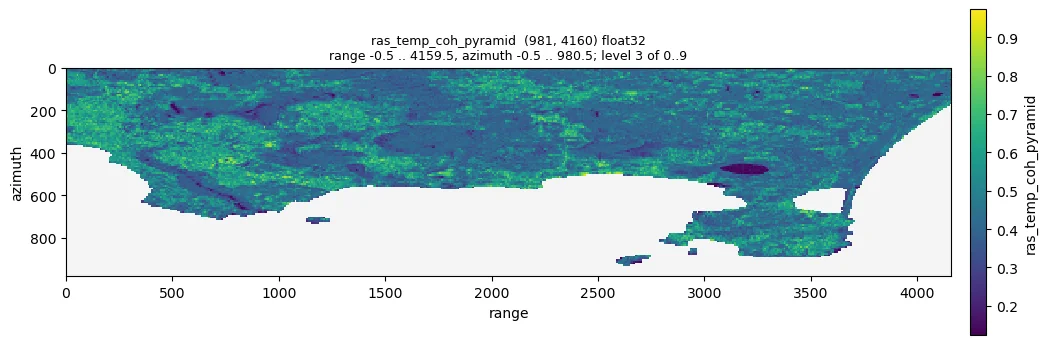
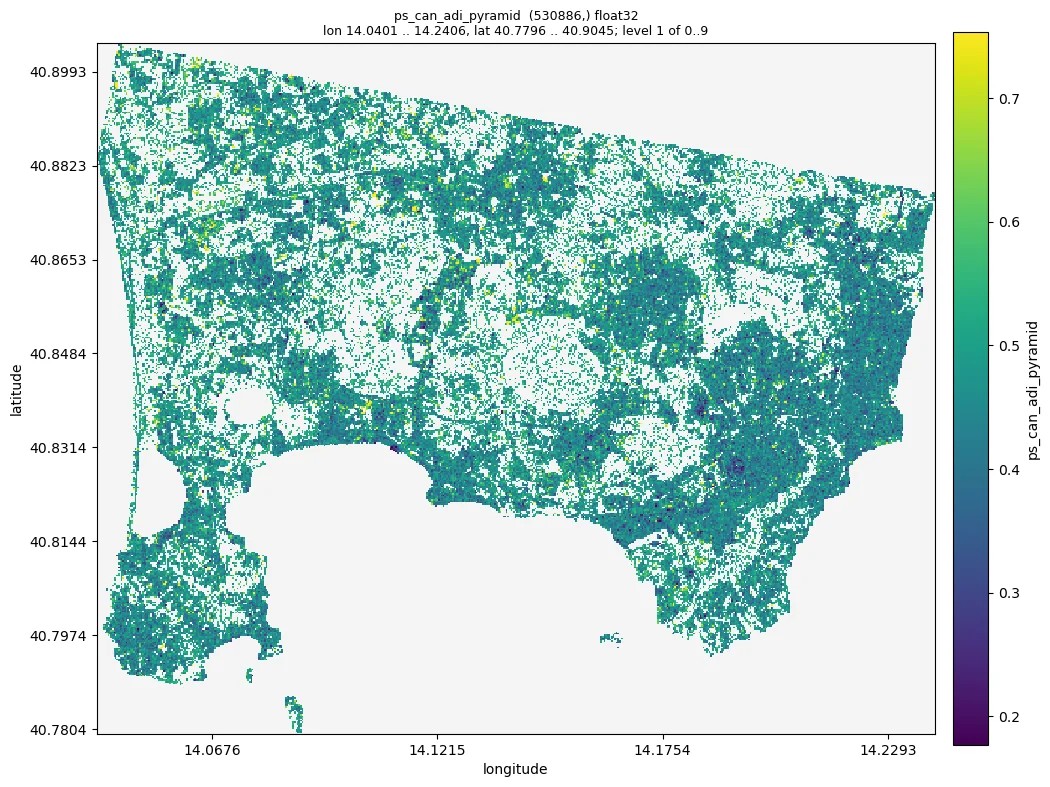
$ moraine info ps/ras_adi_pyramid ps/ras_temp_coh_pyramid ps/ps_can_1_gix.zarr ps/ps_can_2_gix.zarr ps/ps_can_hix.zarr
  ps/ras_adi_pyramid: ... p01=0.255305, p50=0.541975, p99=0.786118
  ps/ras_temp_coh_pyramid: ... p01=0.124025, p50=0.428027, p99=0.973471, max=0.999438
  ps/ps_can_1_gix.zarr: int32 (148706, 2)
  ps/ps_can_2_gix.zarr: int32 (530416, 2)
  ps/ps_can_hix.zarr: int64 (530886,)
Against the guide: amplitude dispersion p50 0.54 (sane 0.3 to 1), temporal coherence within 0 and 1, no warnings. 148 706 candidates have an amplitude dispersion below 0.4 and 530 416 a Noise2Fringe temporal coherence above 0.58; the union is 530 886 points, 22 % of the land pixels (the guide expects a few percent to about 30 %). The coherence is high on the built-up areas and low on the crater lakes, and the candidates cover Pozzuoli, Bacoli and the western suburbs of Naples, not the craters and slopes:
3. DS. The Campi Flegrei tutorial uses the window and thresholds of the example (7 x 27 window, alpha
0.05, at least 80 SHPs, weighted temporal coherence 0.85), so I run it as it is.
$ moraine run examples/03_ds.toml --workdir manual_demo/campi --var shape=981,4160
[shp_test] shp-test ... done in 9.0 s
[phase_linking] emperical-co-emi-temp-coh-pc ... done in 18.6 s
[ds_ph_pyramid] pc-pyramid ... done in 5.1 s
(16 steps, 42 s)
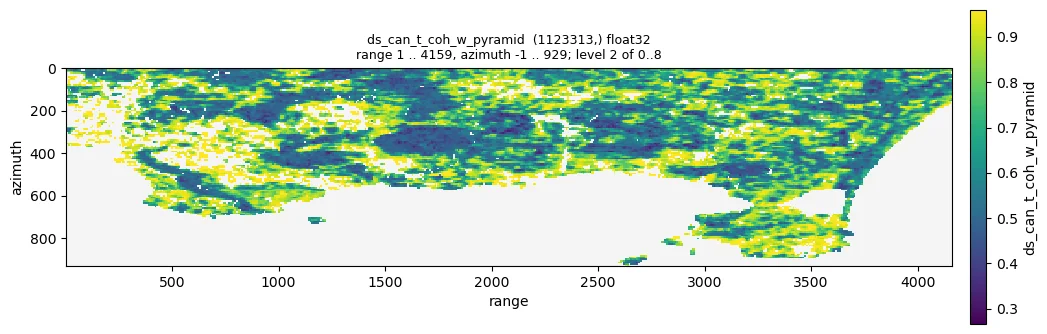
$ moraine info ds/ras_shp_num_pyramid ds/ds_can_t_coh_w_pyramid ds/ds_can_n_components_pyramid \
      ds/ds_can_hix.zarr ds/ds_connected_hix.zarr ds/ds_hix.zarr
  ds/ras_shp_num_pyramid: ... min=0.0, max=189.0, p50=29.0, p99=170.0
  ds/ds_can_t_coh_w_pyramid: ... p01=0.266186, p50=0.589956, p99=0.959546
  ds/ds_can_n_components_pyramid: ... min=1.0, max=85.0, p50=3.0
  ds/ds_can_hix.zarr: int64 (1123313,)
  ds/ds_connected_hix.zarr: int64 (326851,)
  ds/ds_hix.zarr: int64 (167007,)
1 123 313 pixels have at least 80 SHPs; 326 851 of them (29.1 %) have all 92 images connected by coherent image
pairs, and 167 007 of those reach a weighted temporal coherence of 0.85: the DS, 14.9 % of the candidates, as the
guide expects for this data set. The 7 x 27 window of the example is about 100 m x 60 m on the ground: at the full
Sentinel-1 resolution an 11 x 11 window would cover only 26 m across track and give too few SHPs for 92 images.
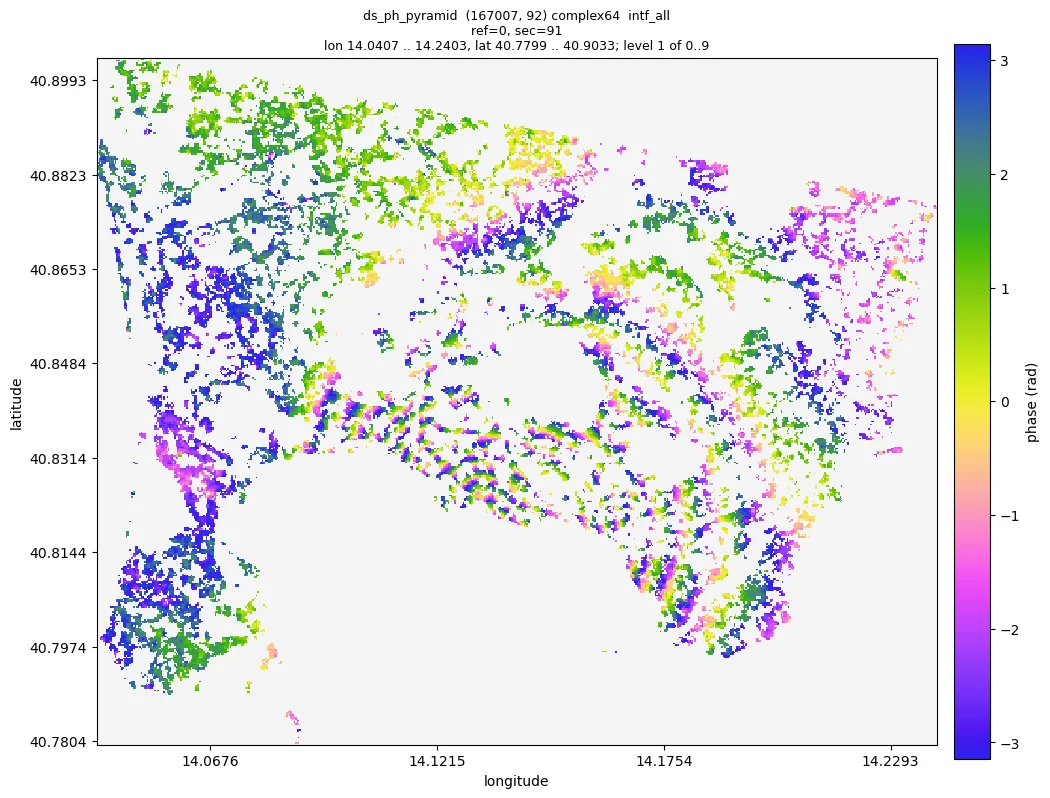
The guide names t_coh_w_min as the first knob (--var t_coh_w_min=0.9 keeps 96 741 points); I keep the default and report it. The weighted temporal coherence is high on the homogeneous slopes and
fields, and the phase linked 2019 to 2021 interferogram of the DS is spatially consistent, with the fringes of
the uplift around Pozzuoli:
4. Merge and refine
$ moraine run examples/04_refine.toml --workdir manual_demo/campi
[merge] pc-union ... done in 8.4 s
[n2ft] n2ft ... done in 28.1 s
[temp_coh] temp-coh ... done in 6.6 s
[pc_ph_pyramid] pc-pyramid ... done in 11.0 s
(9 steps, 95 s)
$ moraine info pc/pc_can_hix.zarr pc/pc_can_temp_coh_pyramid pc/pc_hix.zarr
  pc/pc_can_hix.zarr: int64 (590677,)
  pc/pc_can_temp_coh_pyramid: ... p01=0.21278, p50=0.792471, p99=0.995184
  pc/pc_hix.zarr: int64 (223875,)
$ moraine quicklook pc/pc_ph_pyramid --show intf_all --index 0 91 -o 04_pc_intf_0_91.png
$ moraine quicklook pc/pc_ph_pyramid --show intf_all --index 0 91 --extent 14.08,40.80,14.16,40.86 -o zoom.png
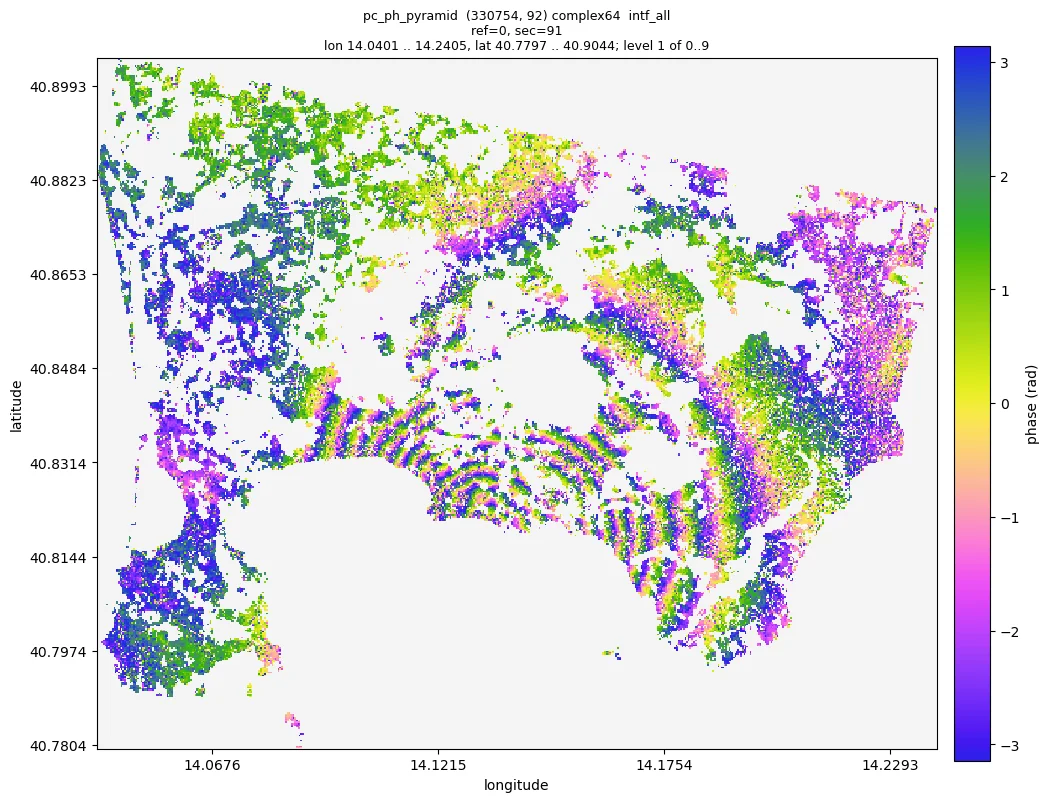
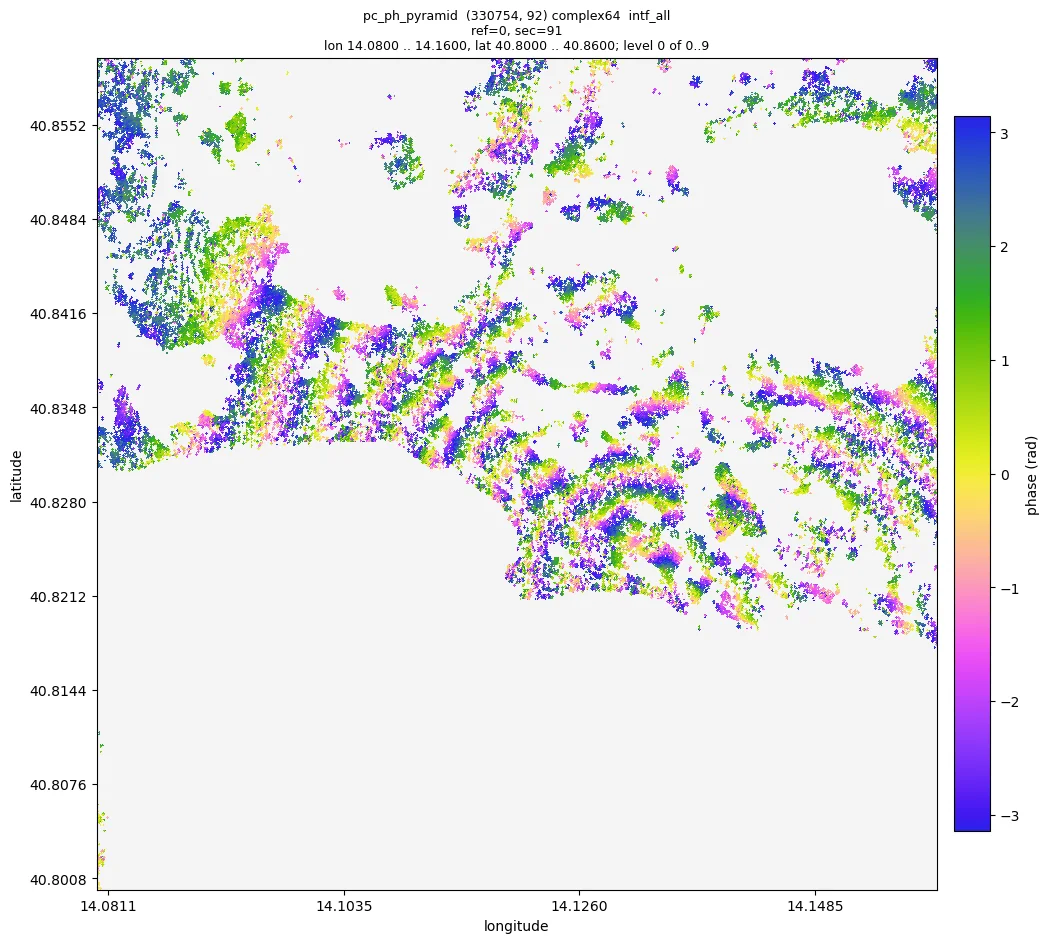
PS candidates and DS merge into 675 687 points; after the Noise2Fringe Transformer 330 754 (49 %) have a temporal coherence above 0.8. Their interferogram between the first and the last image shows the concentric fringes of the caldera uplift centred on Pozzuoli, about ten fringes over three years, continuous across the town; zoomed in (level 0, single points) the fringes are still there in the dense parts:
5. Unwrapping. The guide asks for the pixel spacings of the data; from gamma/rslc/20200707.rslc.par:
2.329562 m in range and 13.9516 m in azimuth.
$ moraine run examples/05_unwrap.toml --workdir manual_demo/campi --var shape=981,4160 \
      --var range_pixel_spacing=2.329562 --var azimuth_pixel_spacing=13.9516
[gix] pc-gix ... done in 0.4 s
[pairs_seq] image-pairs ... done in 0.0 s
[unwrap] mcf-pc ... done in 1.0 s
[unw_pyramid] pc-pyramid ... done in 15.8 s
$ moraine info unw/pc_unw.zarr unw/pc_unw_pyramid
  unw/pc_unw.zarr: float32 (223875, 91) chunks (200000, 1)
  unw/pc_unw_pyramid: ... min=-17.2502, max=13.8788, p01=-6.97704, p50=-0.147673, p99=5.69298
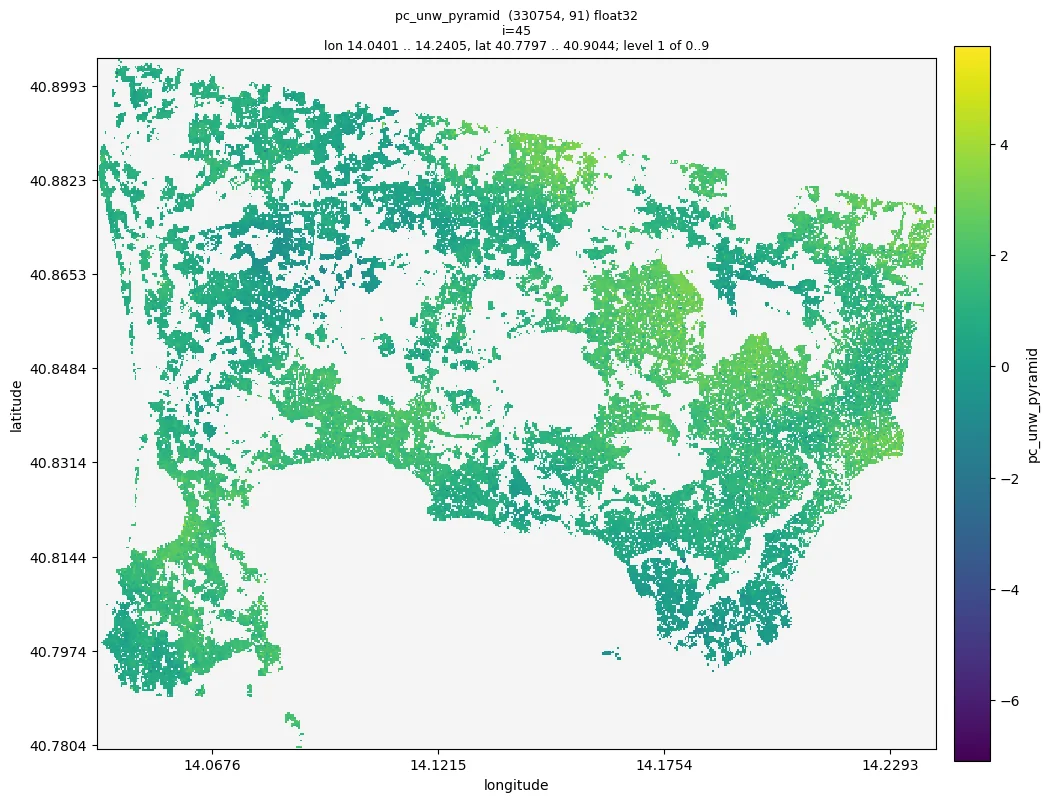
91 sequential interferograms of 330 754 points unwrapped in 2 seconds; the values stay within a few multiples of 2π as the guide expects, and rewrapping the result gives back the input phase (largest difference 5.6e-7 rad over the first ten interferograms). The unwrapped 12 day interferograms are smooth, without isolated 2π jumps between neighbouring areas:
Done. All five pipelines ran on the Campi Flegrei stack (92 dates, 981 x 4160 pixels) in 500 s of processing on one A100; every result is within the ranges of the guides.
| step | result | points |
|---|---|---|
| load | raw/rslc.zarr (981, 4160, 92) |
|
| PS candidates | ps/ps_can_hix.zarr |
530 886 |
| DS | ds/ds_hix.zarr, ds/ds_ph.zarr |
167 007 of 1 123 313 candidates |
| refined points | pc/pc_hix.zarr, pc/pc_ph.zarr (330 754, 92) |
330 754 |
| unwrapped | unw/pc_unw.zarr (330 754, 91), radians |
What I see: the uplift of the caldera, centred on Pozzuoli, as about ten fringes between 2019-01-02 and
2021-12-29 in the phase linked and filtered points, and smooth unwrapped 12 day interferograms. Two things to
decide: the DS selection kept 14.9 % of the candidates (t_coh_w_min 0.85); lowering it to 0.8 keeps more points on
the slopes. And the unwrapped phases have no spatial reference yet: compare points relative to each other, or
choose a reference point in view.ipynb (double click) before you read displacements.
How it works
AGENTS.mdis the entry point for every agent (Claude Code, Codex, Cursor, ...): the environment, how to run and resume the pipelines, how to check results, the data conventions and the rules (never write into the sample data, one GPU pipeline at a time, do not delete results). Tool specific files only point to it (decision 0008), andtests/test_docs.pykeeps it in step with the code.- The workflow guides (
docs/workflows/) give the agent what a colleague would: the parameters, the expected ranges of every result on the sample data, what to look at and what to do when the numbers are off. The example pipelines are verified on real data before they change (decision 0009). - Commands that explain themselves.
moraine list,moraine COMMAND --helpwith shapes, dtypes and defaults from the docstrings, unknown arguments rejected with a suggestion,--jsonwith one object on stdout and the summaries of every output. - Checks without plots.
moraine infogives statistics and anomaly warnings from the pyramids,moraine quicklooka PNG the agent can look at and zoom into,moraine viewa notebook for you. - Pipelines that resume. A failing step prints its error and log; the agent fixes the cause and runs the file again. A changed parameter reruns only what depends on it.
Try it
- Install moraine (and GAMMA if your data are GAMMA results) on the machine with the data and, ideally, a GPU.
- Clone the repository, or copy
AGENTS.md,docs/workflows/andexamples/next to your data: that is all the agent needs besides themorainecommand. -
Start your agent in that directory and ask, for example:
process the GAMMA data in
/data/site_a(reference 20220620, geocoding files 20210802) up to unwrapping in/work/site_a; use one GPU and tell me what you see -
Read what it reports, look at the quicklooks and the
view.ipynbnotebook, and ask for changes in words: "keep more DS", "unwrap a redundant network with EMCF instead", "mask the sea".
The agent does nothing that you could not do yourself with the workflows and the command line; it reads the same pages.